Readers like you help support my blog. When you make a purchase using links on our site, we may earn an affiliate commission! Thank you!

Wednesday, April 1, 2020

How to Secure Your Zoom Meetings from Zoom-Bombing Attacks


By Lawrence Abrams March 31, 2020


Since countries have begun enforcing shelter-in-place and stay-at-home orders during the Coronavirus pandemic, the Zoom video conferencing software has become a popular way to keep in touch with friends and family, and even to join online fitness classes.

However. with Zoom's rise in popularity, a type of attack called 'Zoom-bombing' has also seen more and more activity.

Zoom-bombing is when someone gains unauthorized access to a Zoom meeting to harass the meeting participants in various ways to spread and hate and divisiveness, or to record pranks that will be later shown on social media.

Just yesterday, the FBI released an advisory warning Zoom users that they should properly secure their browsers from Zoom-bombing attacks.

"The FBI has received multiple reports of conferences being disrupted by pornographic and/or hate images and threatening language," the alert published by the FBI warned.

This guide will walk you through securing your Zoom meetings so that virtual get-togethers, meetings, exercise classes, and even happy hours are not Zoom-bombed by unauthorized users.
Privacy considerations when using Zoom

Before we get into learning how to use Zoom, it is important to consider the privacy ramifications of participating in Zoom meetings.

One of the most important things to remember is that a Host can record a Zoom session, including the video and audio, to their computer. Therefore, be careful saying or physically 'revealing' anything that you would not want someone else to potentially see or know about.

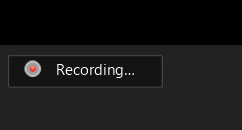
Meeting participants will know when a meeting is being recorded as there will be a 'Recording...' indicator displayed in the top left of the meeting as shown below.


It is also important to remember that a user can download their chat logs before leaving a meeting. These logs will only contain messages that you could see, but not the private chat messages of other users.

Finally, it has been reported that there is no true end-to-end encryption (E2E) between Zoom users' endpoints.

What this means is that only the communication between a meeting participant and Zoom's servers is encrypted, while the related meeting data traversing over Zoom's network is not.

This theoretically means that a Zoom employee could monitor a meeting's traffic and snoop on it, but Zoom has told The Intercept that there are safeguards in place to prevent this type of activity.

"Zoom has layered safeguards in place to protect our users’ privacy, which includes preventing anyone, including Zoom employees, from directly accessing any data that users share during meetings, including — but not limited to — the video, audio and chat content of those meetings. Importantly, Zoom does not mine user data or sell user data of any kind to anyone."
Securing your Zoom meetings

Now that you know the potential privacy risks of using Zoom, before scheduling a meeting with friends or coworkers, you can familiarize yourself with the various ways you can secure Zoom meetings using the steps below.
Add a password to all meetings!

When creating a new Zoom meeting, Zoom will automatically enable the "Require meeting password" setting and assign a random 6 digit password.
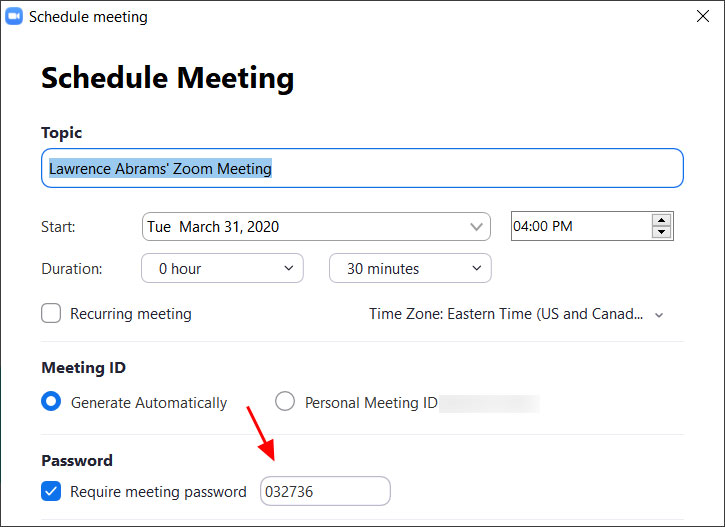


You should not uncheck this option as doing so will allow anyone to gain access to your meeting without your permission.
Use waiting rooms

Zoom allows the host (the one who created the meeting) to enable a waiting room feature that prevents users from entering the meeting without first being admitted by the host.

This feature can be enabled during the meeting creation by opening the advanced settings, checking the 'Enable waiting room' setting, and then clicking on the 'Save' button.
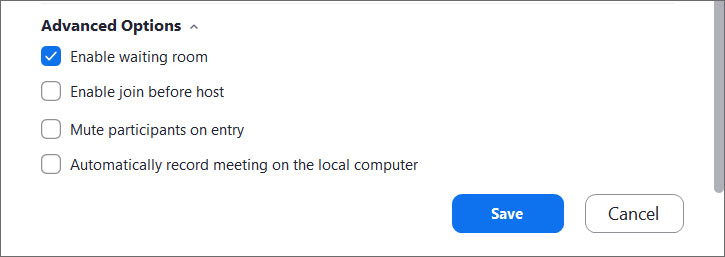
Enable waiting room setting

When enabled, anyone who joins the meeting will be placed into a waiting room where they will be shown a message stating "Please wait, the meeting host will let you in soon."

The meeting host will then be alerted when anyone joins the meeting and can see those waiting by clicking on the 'Manage Participants' button on the meeting toolbar.



You can then hover your mouse over each waiting user and 'Admit' them if they belong in the meeting.
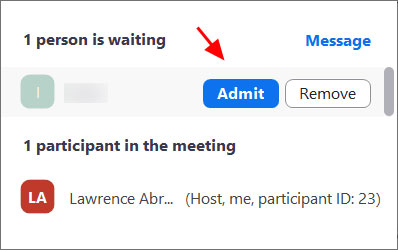
Admit a person into the meeting
Keep Zoom client updated

If you are prompted to update your Zoom client, please install the update.

The latest Zoom updates enable Meeting passwords by default and add protection from people scanning for meeting IDs.

With Zoom being so popular at this time, more threat actors will also focus on it to find vulnerabilities. By installing the latest updates as they are released, you will be protected from any discovered vulnerabilities.
Do not share your meeting ID

Each Zoom user is given a permanent 'Personal Meeting ID' (PMI) that is associated with their account.

If you give your PMI to someone else, they will always be able to check if there is a meeting in progress and potentially join it if a password is not configured.

Instead of sharing your PMI, create new meetings each time that you will share with participants as necessary.
Disable participant screen sharing

To prevent your meeting from being hijacked by others, you should prevent participants other than the Host from sharing their screen.

As a host, this can be done in a meeting by clicking on the up arrow next to 'Share Screen' in the Zoom toolbar and then clicking on 'Advanced Sharing Options' as shown below.



When the Advanced Sharing Options screen opens, change the 'Who Can Share?' setting to 'Only Host'.
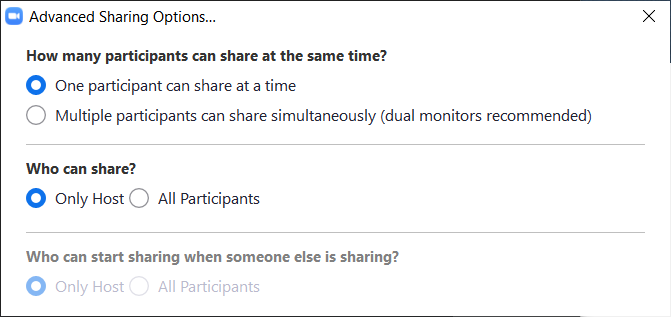


You can then close the settings screen by clicking on the X.
Lock meetings when everyone has joined

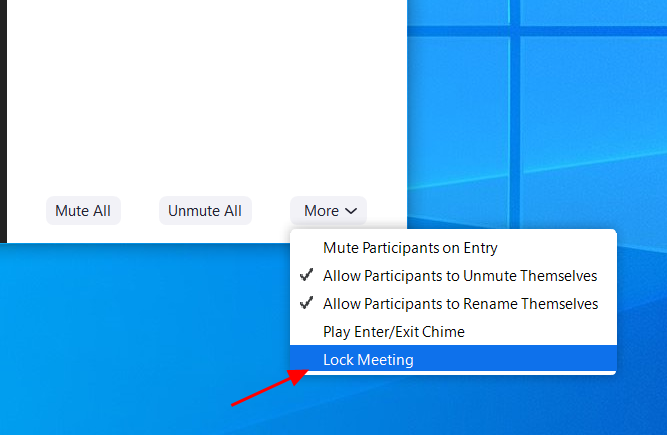
If everyone has joined your meeting and you are not inviting anyone else, you should Lock the meeting so that nobody else can join.

To do this, click on the 'Manage Participants' button on the Zoom toolbar and select 'More' at the bottom of the Participants pane. Then select the 'Lock Meeting' option as shown below.

Do not post pictures of your Zoom meetings

If you take a picture of your Zoom meeting than anyone who sees this picture will be able to see its associated meeting ID. This can then be used uninvited people to try and access the meeting.

For example, the UK Prime Minister Boris Johnson tweeted a picture today of the "first even digital Cabinet" and included in the picture was the meet ID.
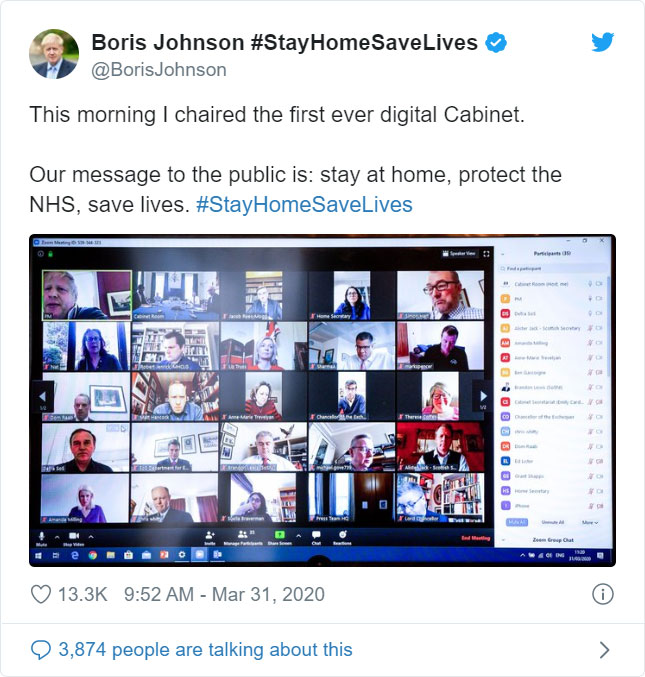


This could have been used by attackers to try and gain unauthorized access to the meeting by manually joining via the displayed ID.
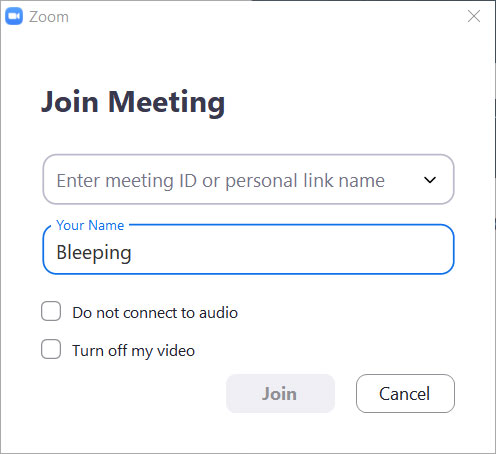
Manually join a meeting by ID

Thankfully, the virtual cabinet meeting was password-protected but does illustrate why all meetings need to use a password or at least a waiting room.
Do not post public links to your meetings

When creating Zoom meetings, you should never publicly post a link to your meeting.

Doing so will cause search engines such as Google to index the links and make them accessible to anyone who searches for them.

As the default setting in Zoom is to embed passwords in the invite links, once a person has your Zoom link they can Zoom-bomb your meeting.
Be on the lookout for Zoom-themed malware

Since the Coronavirus outbreak, there has been a rapid increase in the number of threat actors creating malware, phishing scams, and other attacks related to the pandemic.

This includes malware and adware installers being created that pretend to be Zoom client installers.
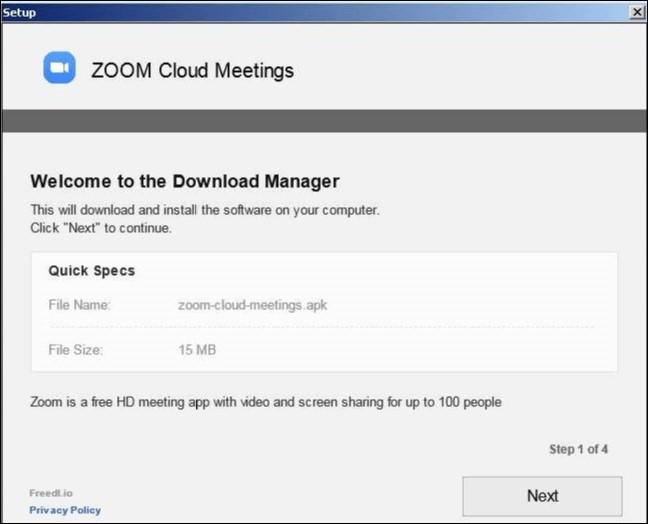
Malicious Zoom installer

To be safe, only download the Zoom client directly from the legitimate Zoom.us site and not from anywhere else.

Microsoft Edge – Password Monitor: Alert όταν σας κλέβουν κωδικούς πρόσβασης

 BySecNews 31 Μαρτίου 2020,


Ο Microsoft Edge εισάγει μια νέα υπηρεσία η οποία ονομάζεται “Password Monitor”. Η υπηρεσία αυτή, θα ειδοποιεί τους χρήστες εάν τα διαπιστευτήρια τους (Κωδικοί πρόσβασης κ.λ.π) έχουν διαρρεύσει σε παραβιάσεις δεδομένων.

Όσο ένας χρήστης χρησιμοποιεί την αυτόματη συμπλήρωση των στοιχείων σύνδεσης, ο Microsoft Edge θα τον ειδοποιήσει εάν τα στοιχεία αυτά έχουν διαρρεύσει, δείχνοντας του μια ειδοποίηση όταν ανοίξει “Νέα καρτέλα” ή όταν επισκεφτεί τη σελίδα που έχει προσβληθεί.

Εάν ο χρήστης πατήσει το κουμπί “Περισσότερες πληροφορίες” στις ειδοποιήσεις, θα μεταφερθεί στη σελίδα του “Password Monitor”, όπου θα μπορεί να δει τα διαπιστευτήρια που έχουν διαρρεύσει και να τα αλλάξει πολύ εύκολα, πατώντας απλά ένα κουμπί, το οποίο θα επιτρέψει την αλλαγή των στοιχείων για τη σελίδα από την οποία έχουν διαρρεύσει.

Πλέον, παραβιάσεις δεδομένων γίνονται καθημερινά, γι’ αυτό ο Microsoft Edge δεν είναι το μόνο πρόγραμμα περιήγησης το οποίο θέλει να προσφέρει μια παρόμοια υπηρεσία. Το Google Chrome, όπως και το Mozilla Firefox, επίσης δημιουργούν υπηρεσίες οι οποίες παρέχουν καλύτερη ασφάλεια για τα διαπιστευτήρια των χρηστών και επιτρέπουν σε αυτούς να χρησιμοποιούν μοναδικούς κωδικούς πρόσβασης σε κάθε σελίδα που επισκέπτονται.

Critical WordPress Plugin Bug Lets Hackers Turn Users Into Admins

By Sergiu Gatlan March 31, 2020 12:27 PM 0


A critical privilege escalation vulnerability found in the WordPress SEO Plugin – Rank Math plugin can allow attackers to give administrator privileges to any registered user on one of the 200,000 sites with active installations if left unpatched.

Rank Math is a WordPress plugin described by its developers as 'the Swiss army knife of WordPress SEO' and designed to help website owners to attract more traffic to their sites through search engine optimization (SEO).

The plugin comes with a setup wizard that configures it via a step-by-step installation process and features support for Google Schema Markup (aka Rich Snippets), keyword optimization, Google Search Console integration, Google keyword rank tracking, and a lot more.

Everyone is a WordPress admin

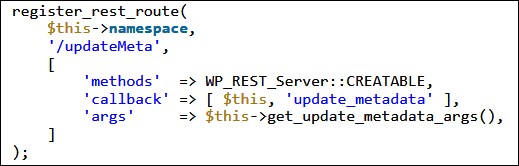
The Rank Math privilege escalation vulnerability was found by Defiant's Wordfence Threat Intelligence team in an unprotected REST-API endpoint.

Successfully exploiting this bug "allowed an unauthenticated attacker to update arbitrary metadata, which included the ability to grant or revoke administrative privileges for any registered user on the site," according to Defiant QA engineer Ram Gall.

To make things even worse, attackers could also lock admins out of their sites by revoking their administrator privileges seeing that a lot of WordPress websites have a single admin user.

"Note that these attacks are only the most critical possibilities," Gall explains. "Depending on the other plugins installed on a site, the ability to update post, term, and comment metadata could potentially be used for many other exploits such as Cross-Site Scripting (XSS)."
Vulnerable REST route (Defiant)
Second vulnerability found in another REST-API endpoint

The researchers also discovered a second vulnerability that made it possible for unauthenticated attackers "to create redirects from almost any location on the site to any destination of their choice."

The bug was found in one of Rank Math's optional plugin modules that would help users to create redirects on their WordPress websites.

"This attack could be used to prevent access to all of a site’s existing content, except for the homepage, by redirecting visitors to a malicious site," according to Gall.

The development team released Rank Math 1.0.41 on March 26, a patched version with fixes for the REST API security issues reported by Defiant's research team on two days earlier on March 24.

As at least one of these two vulnerabilities is seen as critical, Rank Math users are strongly recommended to update to the latest version 1.0.41.2 that contains fixes for both issues.
WordPress sites under siege

Since the start of 2020, attackers have been attempting to take over WordPress websites by exploiting recently patched or zero-day bugs in plugins installed on hundreds of thousands of sites.

In late February attacks on tens of thousands of WordPress sites abusing critical bugs including a zero-day in multiple plugins were spotted by researchers while being used that could have lead to backdoors being planted and rogue admin​​​ accounts being created.

Hackers have also tried to compromise or wipe WordPress sites by exploiting vulnerable plugins with an approximated number of 1,250,000 active installations, as well as several bugs in the WordPress GDPR Cookie Consent plugin used by over 700,000 websites.

Tuesday, March 31, 2020

FBI warns of nation-state actors using the Kwampirs malware March 31, 2020 By Pierluigi Paganini

For the third time in a few weeks, the FBI has issued an alert about supply chain attacks carried out by nation-state actors using the Kwampirs malware.

The FBI has issued an alert about supply chain attacks using the Kwampirs malware as part of a hacking campaign carried out on a global scale by state-sponsored hackers.

The FBI has issued an alert on Monday about state-sponsored hackers using the Kwampirs malware to attack supply chain companies and other industry sectors as part of a global hacking campaign.

Feds warn of Coronavirus attacks aimed at organizations in the healthcare industry.

“Since at least 2016, the FBI has observed an Advanced Persistent Threat (APT) actor conduct a global network exploitation campaign using the Kwampirs Remote Access Trojan (RAT) and is providing additional, non-technical information in an effort to highlight key objectives of the actor campaign. This information, along with previously released FBI Liaison Alert System (FLASH) messages, is intended to enhance the network defense posture of public and private partners.” reads the alert issued by FBI.

The Kwampirs RAT is a modular RAT worm used as a reconnaissance tool, if compromised machine contains data of interest the backdoor “aggressively” spread among other systems with open network shares.

The RAT was first analyzed by Symantec researchers in April 2018, when the researchers uncovered the activity of a cyber espionage group tracked as Orangeworm that targeted organizations in the healthcare sector.

“The Kwampirs RAT is a modular RAT worm that gains system access to victim machines and networks, with the primary purpose of gaining broad, yet targeted, access to victim companies enable follow-on computer network exploitation (CNE) activities.” continues the alert. “Through victimology and forensic analysis, the FBI found heavily targeted industries include healthcare, software supply chain, energy, and engineering across the United States, Europe, Asia, and the Middle East. Secondary targeted industries include financial institutions and prominent law firms.”

The FBI already published two Flash alerts, one containing YARA rules related to the Kwampirs malware and a complete technical report of the threat.

According to the FBI, the group behind these attacks has been active since 2016, but a report published in 2018 by Symantec revealed that the Orangeworm APT was first spotted in January 2015.

Symanted pointed out that the APT group appears to be focused on the healthcare industry, 40% of the targets belong to this industry

The FBI confirmed that the APT group broke into target networks belonging to major transnational healthcare companies, hospital organizations, and other organizations in other industries.

“Kwampirs operations against global healthcare entities have been effective, gaining broad and sustained access to targeted entities. Targeted entities range from major transnational healthcare companies to local hospital organizations. The scope of infections has ranged from localized infected machine(s) to enterprise infections. During these campaigns, the Kwampirs RAT performed daily command and control communications with malicious IP addresses and domains that were hard-coded in the Kwampirs RAT malware. The FBI assesses Kwampirs actors gained access to a large number of global hospitals through vendor software supply chain and hardware products. Infected software supply chain vendors included products used to manage industrial control system (ICS) assets in hospitals.” states the FBI.

Another element that emerged from the FBI alert are the similarities between the Kwampirs malware and Disttrack, which is a wiper also known as Shamoon, that was employed in attacks attributed to Iran-linked APT groups.

At the time is not clear is the FBI issued the alert following recent attacks targeting healthcare organizations.


Pierluigi Paganini

Beware fraud and scams during Covid-19 pandemic


Criminals are using the Covid-19 pandemic to scam the public – don’t become a victim.

Law enforcement, government and private sectors partners are working together to encourage members of the public to be more vigilant against fraud, particularly about sharing their financial and personal information, as criminals seek to capitalise on the Covid-19 pandemic.

Criminals are experts at impersonating people, organisations and the police.

They spend hours researching you for their scams, hoping you’ll let your guard down for just a moment.

Stop: Taking a moment to stop and think before parting with your money or information could keep you safe.

Challenge: Could it be fake? It’s ok to reject, refuse or ignore any requests. Only criminals will try to rush or panic you.

Protect: Contact your bank immediately if you think you’ve fallen for a scam and report it to Action Fraud*.

Your bank or the police will NEVER ask you to transfer money or move it to a safe account.

Criminals are targeting people looking to buy medical supplies online, sending emails offering fake medical support and scamming people who may be vulnerable or increasingly isolated at home. These frauds try to lure you in with offers that look too good to be true, such as high return investments and ‘healthcare opportunities’, or make appeals for you to support bogus charities or those who are ill.

Reports from the public have already included online shopping scams where people have ordered protective face masks, hand sanitiser, and other products, which have never arrived and a number of cases have been identified where fake testing kits have been offered for sale.

Criminals are also using Government branding to try to trick people, including reports of using HMRC branding to make spurious offers of financial support through unsolicited emails, phone calls and text messages.

This situation is likely to continue, with criminals looking to exploit further consequences of the pandemic, such as exploiting financial concerns to ask for upfront fees for bogus loans, offering high-return investment scams, or targeting pensions.

Huge increases in the number of people working remotely mean that significantly more people will be vulnerable to computer service fraud where criminals will try and convince you to provide access to your computer or divulge your logon details and passwords. It is also anticipated that there will be a surge in phishing scams or calls claiming to be from government departments offering grants, tax rebates, or compensation.

Please see below for more information on the most common COVID-19 frauds and the steps you can take to keep yourself safe.

Online Shopping and Auction Fraud

More people may fall victim to #onlineshopping fraud as they self-isolate due to #COVID19. You are a victim of online shopping fraud if you buy goods from an online seller that never arrive.

Computer Software Service Fraud

As more people work from home due to #COVID19, fraudsters may capitalise on slow networks and IT problems, to commit computer software service fraud. Be wary of cold calls or unsolicited emails offering you help with your device or to fix a problem

Lender Loan Fraud

People may be worrying about their finances during the #COVID19 outbreak. Lender loan fraudsters will use the opportunity to:

- approve your application for a fast loan regardless of your credit history

- ask you to pay an upfront fee

- take your payment and never provide the loan

Pension Liberation Fraud and Investment Fraud

Fraudsters could try to take advantage of the financial uncertainty surrounding #COVID19 by offering people sham investment opportunities. If you get a cold call or unsolicited email offering you a deal that sounds too good to be true, it probably is.

Mandate Fraud

As more people work from home due to #COVID19, fraudsters may try to get you to change a direct debit, standing order or bank transfer mandate, to divert funds to their bank account, by purporting to be an organisation you make regular payments to.

Phishing

A number of #COVID19 related phishing emails have been reported to Action Fraud. These emails attempt to trick you into opening malicious attachments which could lead to fraudsters stealing your personal information, logins, passwords, or banking details.

Update 26/03: The Government has only sent one text message to the public regarding new rules about staying at home to prevent the spread of COVID-19. Any others claiming to be from UK Government are false.

“Criminals are able to use spoofing technology to send texts and emails impersonating organisations that you know and trust. We would remind anyone who receives an unexpected text or email asking for personal or financial details not click on the links or attachments, and don’t respond to any messages that ask for your personal or financial details.