Readers like you help support my blog. When you make a purchase using links on our site, we may earn an affiliate commission! Thank you!

Friday, March 13, 2020

Rocket Loader skimmer impersonates CloudFlare library in clever scheme


Rocket Loader skimmer impersonates CloudFlare library in clever scheme

Posted: March 10, 2020 by Jérôme Segura
Last updated: March 11, 2020


Update: The digital certificate issued for https[.]ps has been revoked by GlobalSign.

Fraudsters are known for using social engineering tricks to dupe their victims, often times by impersonating authority figures to instill trust.

In a recent blog post, we noted how criminals behind Magecart skimmers mimicked content delivery networks in order to hide their payload. This time, we are looking at a far more clever scheme.

This latest skimmer is disguised as a JavaScript file that appears to be CloudFlare’s Rocket Loader, a library used to improve page load time. The attackers created an almost authentic replica by registering a specially crafted domain name.

This campaign has been affecting a number of e-commerce sites and shows threat actors will continue to come up with ingenious ways to deceive security analysts and website administrators alike.
Decoy Rocket Loader

On a compromised Magento site, we noticed that attackers had injected a script purporting to be the Rocket Loader library. In fact, we can see two almost identical versions loaded side by side.

If we look at their source code, we find that the two scripts are quite different. One of them is obfuscated, while the other is recognizable as the legitimate CloudFlare Rocket Loader library.

There is a subtle difference in the URI path loading both scripts. The malicious one uses a clever way to turn the domain name http.ps (note the dot ‘.’ , extra ‘p’ and double slash ‘//’) into something that looks like ‘https://’. The threat actors are taking advantage of the fact that since Google Chrome version 76, the “https” scheme (and special-case subdomain “www”) is no longer shown to users.

To reveal the full URL with its protocol, you can double click inside the address bar. In other browsers such as Firefox or Edge, the default is to show the entire URL. That makes this attack a little more obvious and therefore less effective if you were a site administrator investigating this library.
Active skimmer campaign

The Palestinian National Internet Naming Authority (PNINA) is the official domain registry for the .ps country code Top-Level-Domain (ccTLD). The decoy domain http.ps was registered on 2020-02-07 via the Key-Systems GmbH registrar.

In mid-February, security researcher Willem de Groot tweeted about how this domain was being used for credit card skimming in an ongoing campaign with the additional “e4[.]ms” domain.

The skimmer code as well as its exfiltration gate (autocapital[.]pw), were described by Denis Sinegubko, a security researcher at GoDaddy/Sucuri.

There are two ways e-commerce sites are being compromised:
Skimming code that is injected into a self hosted JavaScript library (the jQuery library seems to be the most targeted)
A script that references an external JavaScript, hosted on a malicious site

The first version of the skimmer used in this campaign is the hex obfuscated type with data exfiltration via autocapital[.]pw as seen in the decoy Rocket Loader library. As Denis mentioned in his tweet, this skimmer contains an English and Portuguese version (urlscan.io archive here).

The other version of the skimmer (hosted on e4[.]ms) uses a different obfuscation scheme with data exfiltration via xxx-club[.]pw (this domain is on the same server as the autocapital[.]pw exfiltration gate).

We recognize this obfuscation pattern as ‘Radix’, from a previous campaign described and tracked by Sucuri since 2016. Given the naming convention used for the domains and skimmers, we believe the same threat actors may be behind this newest wave of attacks.
Patching and proactive security

This kind of attack reinforces the importance of good website security. The majority of compromises happen on sites that have not been updated or that use weak login credentials. These days, other forms of defense include web application firewalls and general hardening of the CMS and its server.

The majority of consumers that shop on a compromised site will have no idea that something went wrong until it’s too late. Even though it is the responsibility of the merchant to ensure their platform is secure, it is obvious that additional containment needs to be taken by visitors themselves.

Malwarebytes users are protected against this credit card skimming attack via our web protection layer in Malwarebytes for consumers and businesses.

We have reached out to the registrar and certificate authority but at the time of writing the malicious decoy domain is still active.
Indicators of compromise

Skimmers and gateshttp[.]ps autocapital[.]pw xxx-club[.]pw e4[.]ms y5[.]ms
83.166.248[.]67
83.166.244[.]189

Thursday, March 12, 2020

TRRespass research reveals rowhammering is alive and well

by Paul Ducklin


We’re not sure quite how dangerous this problem is likely to be in real life, but it has the most piratical name for a bug that we’ve seen in quite some time, me hearties.

TRRespass is how it’s known (rrrroll those Rs if you can!) – or plain old CVE-2020-10255 to the landlubber types amongst us.

Trespass is the legal name for the offence of going onto or into someone else’s property when you aren’t supposed to.

And TRR is short for Target Row Refresh, a high-level term used to describe a series of hardware protections that the makers of memory chips (RAM) have been using in recent years to protect against rowhammering.

So TRRespass is a series of cybersecurity tricks involving rowhammering to fiddle with data in RAM that you’re not supposed to, despite the presence of low-level protections that are supposed to keep you out.

Rowhammering is a dramatically but aptly named problem whereby RAM storage cells – usually constructed as a grid of minuscule electrical capacitors in a silicon chip – are so tiny these days that they can be influenced by their neighbours or near neighbours.

It’s a bit like writing the address on an envelope in which you’ve sealed a letter – a ghostly impression of the words in the address is impinged onto the paper inside the envelope.

With a bit of care, you might figure out a way to write on the envelope in such a way that you alter the appearance of parts of the letter inside, making it hard to read, or even permanently altering critical parts (obscuring the decimal points in a list of numbers, for example).

The difference with rowhammering, however, is that you don’t need to write onto the envelope to impinge on the letter within – just reading it over and over again is enough.

In a rowhammering attack, then, the idea is to be able to modify RAM that you aren’t supposed to access at all (so you are writing to it, albeit in a somewhat haphazard way), merely by reading from RAM that you are allowed to look at, which means that write-protection alone isn’t enough to prevent the attack.
One row at a time

To simplify the otherwise enormous number of individual control connections that would be needed, you can’t read just one bit at a time from most RAM chips.

Instead, the cells storing the individual bits are arranged in a series of rows that can only be read out one full row at a time.4×4 grid of memory cells representing a DRAM chip

To read cell C3 above, for example, you would tell the row-selection chip to apply power along row wire 3, which would discharge the capacitors A3, B3, C3 and D3 down column wires A, B, C and D, allowing their values to be determined. (Bits without any charge will read out as 0; bits that were storing a charge as 1.)

You’ll therefore get the value of four bits, even if you only need to know one of them.

Incidentally, reading out a row essentially wipes its value by discharging it, so immediately after any read, the row is refreshed by saving the extracted data back into it, where it’s ready to be accessed again.

Also, because the charge in any cell leaks away over time anyway, every row needs regularly refreshing whether it is used or not.

The RAM circuitry does this automatically, by default every 64 milliseconds (that’s about 16 times a second, or just under 1,000 times a minute).

That’s why this sort of memory chip is known as DRAM, short for dynamic RAM, because it won’t keep its value without regular external help.

(SRAM, or static RAM, holds its value as long as it’s connected to a power supply; Flash RAM will hold its value indefinitely, even when the power is turned off.)
Exploiting the refresh

One problem with this 64ms refresh cycle is, if a RAM row loses its charge or otherwise gets corrupted between two cycles, that the corruption won’t be noticed – the “recharge” will kick in and refresh the value using the incorrect bits.

And that’s where rowhammering comes in.

In 64ms you can trigger an enormous number of memory reads along one memory row, and this may generate enough electromagnetic interference to flip some of the stored values in the rows on either side of it.

The general rule is that the more you hammer and the longer the cell has been leaking away its charge, the more likely you are to get a bitflip event.

You can even do what’s called double-sided rowhammering, assuming you can work out what memory addresses in your program are stored in which physical regions of the chip, and hammer away by provoking lots of electrical activity on both sides of your targeted row at the same time.

Think of it as if you were listening to a lecture on your headphones: if attackers could add a heap of audio noise into your left ear, you’d find it hard to hear what the lecturer was saying, and might even misunderstand some words; if they could add interference into both ears at the same time, you’d hear even less, and misunderstand even more.
Reducing the risk

Numerous ways have emerged, in recent years, to reduce the risk of rowhammering, and to make real-world memory-bodging attacks harder to pull off.

Anti-rowhammering techniques include:
Increasing the DRAM refresh rate. The longer a bit goes unrecharged, the more likely it is to flip due to on-chip interference. But recharging the cells in a DRAM row is done by reading their bit values out redundantly, thus forcing a refresh. The time spent refreshing the entire chip is therefore a period during which regular software can’t use it, so that increasing the refresh rate reduces performance.

Preventing unprivileged software from flushing cached data. If you read the same memory location over and over again, the processor is supposed to remember recently used values in an internal area of super-fast memory called a cache. This naturally reduces the risk of rowhammering, because repeatedly reading the same memory values doesn’t actually cause the chip itself to be accessed at all. So, blocking unauthorised programs from executing the clflush CPU instruction prevents them from bypassing the cache and getting direct access to the DRAM chip.
Reducing the accuracy of some system timers. Rowhammering attacks were invented that would run inside a browser, and could therefore be launched by JavaScript served up directly from a website. But these attacks required very accurate timekeeping, so browser makers deliberately added random inaccuracies to JavaScript timing functions to thwart these tricks. The timers remained accurate enough for games and other popular browser-based apps, but not quite precise enough for rowhammering attackers.
A Target Row Refresh (TRR) system in the chip itself. TRR is a simple idea: instead of ramping up the refresh rate of memory rows for the entire chip, the hardware tries to identify rows that are being accessed excessively, and quietly performs an early refresh on any nearby rows to reduce the chance of them suffering deliberately contrived bit-flips.

In other words, TRR pretty much does what the name suggests: if a DRAM memory row appears to be the target of a rowhammer attack, intervene automatically to refresh it earlier than usual.

That way, you don’t need to ramp up the DRAM refresh rate for every row, all the time, just in case a rowhammer happens to one row, some of the time.

So, the authors of the TRRespass paper set out to measure the effectiveness of the TRR mitigations in 42 different DRAM chips manufactured in the past five years.

They wanted to find out:
How different vendors actually implement TRR. (There’s no standard technique, and most of those used have not been officially documented by the chip vendor.)
How various TRR implementations might be tricked and bypassed by an attacker.
How effective rowhammering attacks might be these days, even with TRR in many chips.

We’ll leave you to work through the details of the report, if you wish to do so, though be warned that it’s quite heavy going – there’s a lot of jargon, some of which doesn’t get explained for quite a while, and the content and point-making is rather repetitive (perhaps a side-effect of having eight authors from three different organisations).

Nevertheless, the researchers found that they were able to provoke unauthorised and probably exploitable memory modifications on 13 of the 42 chips they tested, despite the presence of hardware-based TRR protections.

Fortunately, they didn’t find any common form of attack that worked against every vendor’s chip – each vulnerable chip typically needed a different pattern of memory accesses unleashed at a different rate.

Even though you can’t change the memory chips in your servers or laptops every few days, this suggests that any successful attack would require the crooks to get in and carry out a fair bit of “hardware reconnaissance and research” on your network first…

…in which case, they probably don’t need to use rowhammering, because they’ve already got a dangerous foothold in your network already.

It also suggests that, in the event of attacks being seen in the wild, changes to various hardware settings in your own systems (admittedly with a possible drop in performance) might be an effective way to frustrate the crooks.
What to do?

Fortunately, rowhammering doesn’t seem to have become a practical problem in real-life attacks, even though it’s widely known and has been extensively researched.

So there’s no need to stop using your existing laptops, servers and mobile phones until memory manufacturers solve the problem entirely.

But at least part of the issue is down to the race to squeeze more and more performance out of the hardware we’ve already got, because faster processors mean we can hammer memory rows more rapidly than ever, while higher-capacity RAM modules gives us more rows to hammer at any time.

As we said last time we reported on rowhammering:


[Whenever] you add features and performance – whether that’s [ramping up memory and processing power], building GPUs into mobile phone chips, or adding fancy graphics programming libraries into browsers – you run the risk of reducing security at the same time.

If that happens, IT’S OK TO BACK OFF A BIT, deliberately reducing performance to raise security back to acceptable levels.

Sometimes, if we may reduce our advice to just seven words, it’s OK to step off the treadmill.

Diagram of DRAM cells reworked from Wikimedia under CC BY-SA-3.0.

Avast disables JavaScript engine in its antivirus following major bug

WordPress Database Brute Force and Backdoors

WordPress Database Bruteforce

We regularly talk about brute force attacks on WordPress sites and explain why WordPress credentials should always be unique, complex, and hard to guess.

However, the WordPress login is not the only point of entry that hackers use to break into sites. Since the WordPress CMS stores most of its settings in a database, attackers can get access directly to the database to modify functionality and inject malicious code.
Brute Force Attacks on WordPress Databases

Databases are another potential target for brute force attacks. Hosting providers usually prevent access from external networks to their own database servers to minimize the risks of unwanted connections. That being said, usually hundreds — or even thousands — of websites connect to the same database server, so hackers just need to compromise a single site to start a database brute force attack from an internal IP.

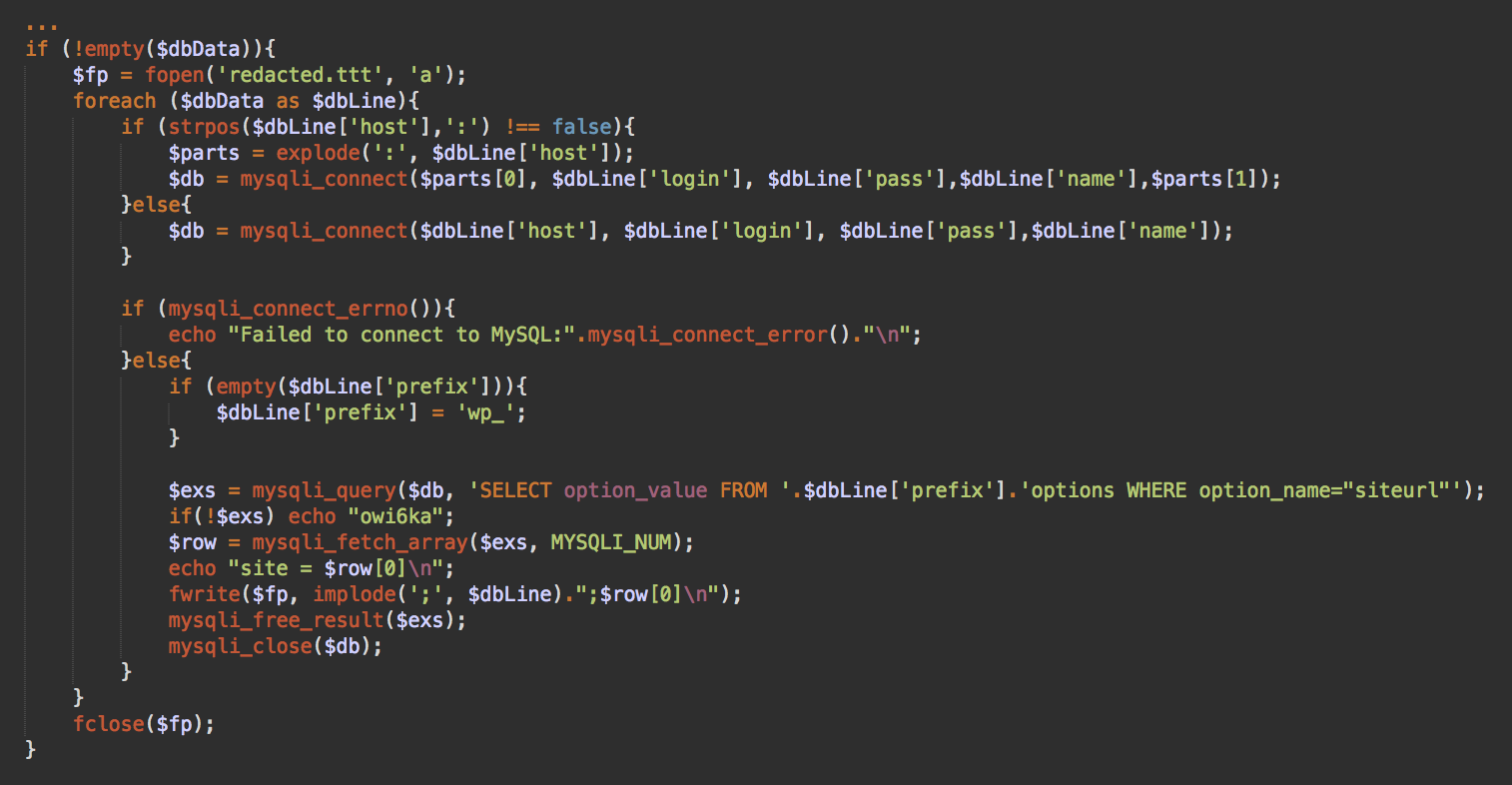
For example, one database brute force script we recently found (base.php) loads multiple database credentials from .txt files.
DB_NAME 
DB_USER 
DB_PASSWORD 
DB_HOST 
table_prefix


The script then tries to use these credentials to connect to the database. If a connection is established, they try to obtain the siteurl option from the WordPress wp_options table, which helps the attacker identify which site the matched credentials belong to.


Interesting note: This script prints “owi6ka” if it can’t query the siteurl from the database. This word uses Latin gomoglyths to represent the Russian word “ошибка” (error).
Feasibility of Database Brute Force Attacks

Of course, this approach to brute forcing database credentials may seem significantly more difficult since the attacker is required to guess five connection parameters instead of just two. It’s worth noting that most reputable hosting providers implement proper configuration and assign randomized database names, which mitigates the risk of this type of attack. However, when hosting providers don’t follow security best practices, the approach may still be worthwhile — as demonstrated below.

For example, if you compromise one site on a shared server, you get the host name of the database that is shared by many other sites. Lots of sites use the default “wp_” table prefix. This leaves us with three more parameters to guess.

If the hosting provider has a known pattern of naming databases and database users, then the patterns can be used to generate credentials to probe. All of these prerequisites significantly reduce the difficulty level of guessing database credentials. And given that the attack can’t be blocked by plugins or HTTP-level firewalls and comes from an internal network, this attack approach can try lots of combinations without much interference.

Of course, this is only possible if the database server firewall is not configured to block excessive failed logins — and setting this up can be tricky, since you can’t block an internal IP address that is shared by hundreds of other client sites that rely on the database every second.
Alternative Use Scenarios

This malicious brute force script can be also used in the following scenarios:

If a server’s accounts are not properly isolated and the attacker is able to obtain access to even a single website, it becomes possible to obtain read access to wp-config.php files from other sites and accounts on the same shared server. Credentials from these files can be used by this script to connect to the databases of neighboring sites and find out their addresses.

Another scenario arises when hackers break into a site and want to maintain access to it. The main way to accomplish this is to plant various backdoor scripts and create rogue admin users. However, both of these solutions can be detected and removed during a site cleanup. On the other hand, if hackers successfully guess or steal the credentials of a legitimate admin user, they can also reuse them indefinitely. That’s why we strongly encourage website owners to change all of their passwords after every site compromise.

While many site owners change CMS passwords, however, very few of them ever change their database passwords. So, if hackers steal the database credentials, they leave no traces on the compromised site but still can access it (usually from other compromised sites on the same shared environment).

This script we discovered could easily help them manage the list of the stolen credentials and verify which of them are still valid.
Conclusion

While database brute force attacks are not seen often in the wild, there is definitely some interest in alternative attack vectors.

Ensuring that hosts properly configure their shared server environments may significantly mitigate risks to client websites. User accounts should be completely isolated so that CMS configuration files cannot be read by neighbors. Hosts should assign hard to guess database names and database user names. When installing WordPress, webmasters should also be creative when choosing prefix for WordPress database.

When a CMS website has been compromised, you can bet that hackers aren’t just planting backdoors and malicious code on the site. There’s a less-obvious aspect to a compromise that some users may not consider: attackers will also be on the lookout for password and database credentials found in CMS configuration files, such as wp-config — and it’s virtually impossible to detect if an attacker has gathered these at any stage of the infection.

If a compromise occurs, you should be vigilant in updating passwords across your entire environment — including the database. If you don’t change the database credentials after cleanup, hackers may still have access and be able to modify your site via compromised neighbor accounts on the same host, which is not that uncommon in shared hosting environments.

Site owners can refer to our website security guide on best practices and other ways to mitigate risk. If you believe your WordPress website or database has been hacked, we can help clean up the website infection and secure your environment from future compromise.

Tuesday, March 10, 2020

Battling online coronavirus scams with facts


SOCIAL ENGINEERING
Battling online coronavirus scams with facts

Posted: February 10, 2020 by David Ruiz
Last updated: March 5, 2020


UPDATE 03/05/2020: Yesterday, our malware intelligence researchers found a clever ploy to hide a credential and payment card skimmer behind a website that purported to show updated coronavirus cases on a global map.

Malwarebytes detected the malware which carried the ominous and maybe-too-obvious name “corona.exe.” Upon further analysis, we learned that this malware was actually just a variant of AzorUlt, a family of spyware that steals information and sometimes downloads additional malware. Though we initially named the threat “Trojan.Corona,” we have now updated the name to “Spyware.AzorUlt.”

Unlike similar coronavirus scams we discovered last month, this threat does not rely on an email campaign.

Original story below.

Panic and confusion about the recent coronavirus outbreak spurred threat actors to launch several malware campaigns across the world, relying on a tried-and-true method to infect people’s machines: fear.

Cybercriminals targeted users in Japan with an Emotet campaign that included malicious Word documents that allegedly contained information about coronavirus prevention. Malware embedded into PDFs, MP4s, and Docx files circulated online, bearing titles that alluded to protection tips. Phishing emails that allegedly came from the US Centers for Disease Control and Prevention (CDC) were spotted, too. Malwarebytes also found a novel scam purporting to direct users to a donation page to help support government and medical research.

All of these threats rely on the same dangerous intersection of misinformation and panic—a classic and grotesque cybercrime tactic. A great defense to these is, quite simply, the truth.

At Malwarebytes, we understand that safeguarding you from cyberthreats goes beyond technological protection. It also means giving you the information you need to make smart, safe decisions. Because of this, we’re presenting verified resources and data about coronavirus that will hopefully steer users away from online threats. If you see a sketchy-looking email mentioning the virus (like the one we found below), don’t open it. Instead, come here. If you want to immediately see what these online scams look like, scroll below.
What is coronavirus?

According to the World Health Organization, the current coronavirus that has infected thousands of people across the world is a single variant of a broader family of viruses, also called “coronavirus.” This particular strain of coronavirus was first identified in the city of Wuhan in central China’s Hubei province. It has the title “2019-nCoV.” Though 2019-nCoV is from the same family of coronaviruses as SARS—which spread to 26 countries between 2002 and 2003—it is not the same virus.

As of February 7, coronavirus has spread to at least 25 countries, including Australia, Vietnam, the United States, the Philippines, Nepal, Sweden, the United Kingdom, India, and more. Mexico has no reported cases—the only country in North America to avoid the virus, it appears. Countries in South America, including Brazil, Colombia, Venezuela, and Chile, have not reported any confirmed cases of the virus, either. While the majority of infections are reported in China, with 31,211 confirmed cases, the highest count of any other country is Singapore, with 30 cases.

Full, daily reports on the virus’ spread can be found at the World Health Organization’s resource page here: Novel Coronavirus (2019-nCoV) situation reports. The situation reports also provide information about every country with confirmed coronavirus cases, and this Al Jazeera article compiles that information up to February 6.

According to a February 6 report in The Wall Street Journal that cites scientists and medical academics in China, the recent coronavirus likely started in bats.

According to the US Center for Disease Control, coronavirus symptoms include fever, cough, and shortness of breath.
How can I protect myself from coronavirus?

Because coronavirus spreads from human-to-human contact, the best protection methods involve good hygiene. According to the WHO, individuals should:
Wash your hands frequently with soap and water or use an alcohol-based hand rub if your hands are not visibly dirty.
Maintain social distancing—maintain at least 1 meter (3 feet) distance between yourself and other people, particularly those who are coughing, sneezing and have a fever.
Avoid touching eyes, nose, and mouth.
If you have fever, cough, and difficulty breathing, seek medical care early. Tell your health care provider if you have travelled in an area in China where 2019-nCoV has been reported, or if you have been in close contact with someone with who has travelled from China and has respiratory symptoms.
If you have mild respiratory symptoms and no travel history to or within China, carefully practice basic respiratory and hand hygiene and stay home until you are recovered, if possible.

The WHO also actively dispelled some current myths about coronavirus. For instance, individuals cannot catch the virus from dogs and cats that are their pets, and vaccines against pneumonia do not protect against coronavirus.

For more information on coronavirus myths, please visit the WHO Myth Busters page here, along with the WHO Q&A page.
What else should I know about coronavirus?

Coronavirus is a serious threat, but it is not the world-ending plague that many fear. As of February 7, the virus has resulted in 637 total deaths. A February 6 notice by the Chinese media service CGTN reported more recoveries, at 1,542.

Individuals should not fear receiving packages from China, the WHO said, as the virus cannot survive long durations on physical objects like packages and letters. Similarly, individuals should not dip into unmeasured fear of all things Chinese. These fears have turned New York’s Chinatown district into a “ghost town,” said one local business owner, and have fueled multiple xenophobic and racist assumptions across the world.The WHO says it is okay to receive packages delivered from China.

Coronavirus has also received a strong global response. Air travel has been severely limited, Olympic qualifying games were relocated, workers built a hospital in about 10 days, fast food restaurants temporarily closed their locations, and China closed off entire populations—which has come with its own tragic tales of quarantine camps, isolation, and fear.

The spread of the virus is scary, yes, but people are working day and night to prevent greater exposure.
What should I know about coronavirus scams?

Coronavirus online scams are largely similar to one another. By preying on misinformation and fear, cybercriminals hope to trick unwitting individuals into opening files and documents that promise information about the virus.

However, Malwarebytes recently found an email scam that preys on people’s desire to help during a moment like this.

The scam email—titled “URGENT: Coronavirus, Can we count on your support today?”—purportedly comes from the nondescript “Department of Health.” Inside, the email asks users to donate to coronavirus prevention causes.

“We need your support , Would you consider donating 100 HKD to help us achieve our mission?” the email says near its end, before offering a disguised link that opens an application, not a website. The link itself begins with neither HTTPS or HTTP, but “HXXP.”A screenshot of an emailed coronavirus scam that preys on users’ good will.

Routine scams that allegedly include information about prevention and protection also come through emails, like this phishing scam spotted by Sophos.A screenshot of the emailed coronavirus scam that Sophos discovered.

The malicious email informs its recipient to open an attached document that includes information about “safety measures regarding the spreading of coronavirus,” which then directs users to a page that asks for their email address and password.

These scams are becoming a dime a dozen, and we don’t expect them to dwindle any time soon. In fact, threat actors in China were spotted sending malware around through email and through the Chinese social media platform WeChat. Though the exact types of malware were not reported, the Computer Virus Emergency Response Center said the malware itself could be used to steal data or remotely control victims’ devices.
Coronavirus information and data resources

If you’re afraid about the spread of coronavirus, we understand. But please, do not click any links in any sketchy emails, and do not donate to any causes you have not already vetted outside of your email client.

If you want to know up-to-the-date information about the virus, again, please visit the following resources:
The World Health Organization’s main information page on the virus
The WHO’s daily “situation reports”
The WHO’s “Mythbusters” page
The WHO’s public advice guide
The Center for Disease Control and Prevention’s main information page on the virus

Stay safe, everyone.